Friday, 18 October 2013
Unit 26 Assignment 2 Magazine article
https://docs.google.com/file/d/0B_bbB5DUQigrQjBXaDFPU2xvdG8/edit?usp=sharing

Thursday, 17 October 2013
Unit 26 Assignment 3
Harry Potter
Harry potter Franchise- Wand, Costume, Books, Poster, Games, Mugs, Phone cases, Accessories etc.
 |
| wand |
 |
| Books toys |

|
Unit 26 Assignment 3
2 Film
1. http://www.youtube.com/watch?v=l2h75LLhxM4
2. http://www.youtube.com/watch?v=xBzPioph8CI

The audience like fast 6 because of the car racing, the action and the comedy
The sound in fast 6 is amazing as you can hear the cars accelerate and you can even hear the fighting music when the action start
this film is for teen and over as it has got violence
the trailer for fast 6 is good as the film has got explosion, car chase, action, comedy. people will love this film.

this film is for kids as they like cartoon
the audience mostly kids will like it as there is no violence
the sound is good as you can hear the
2 film poster
Dark Knight-
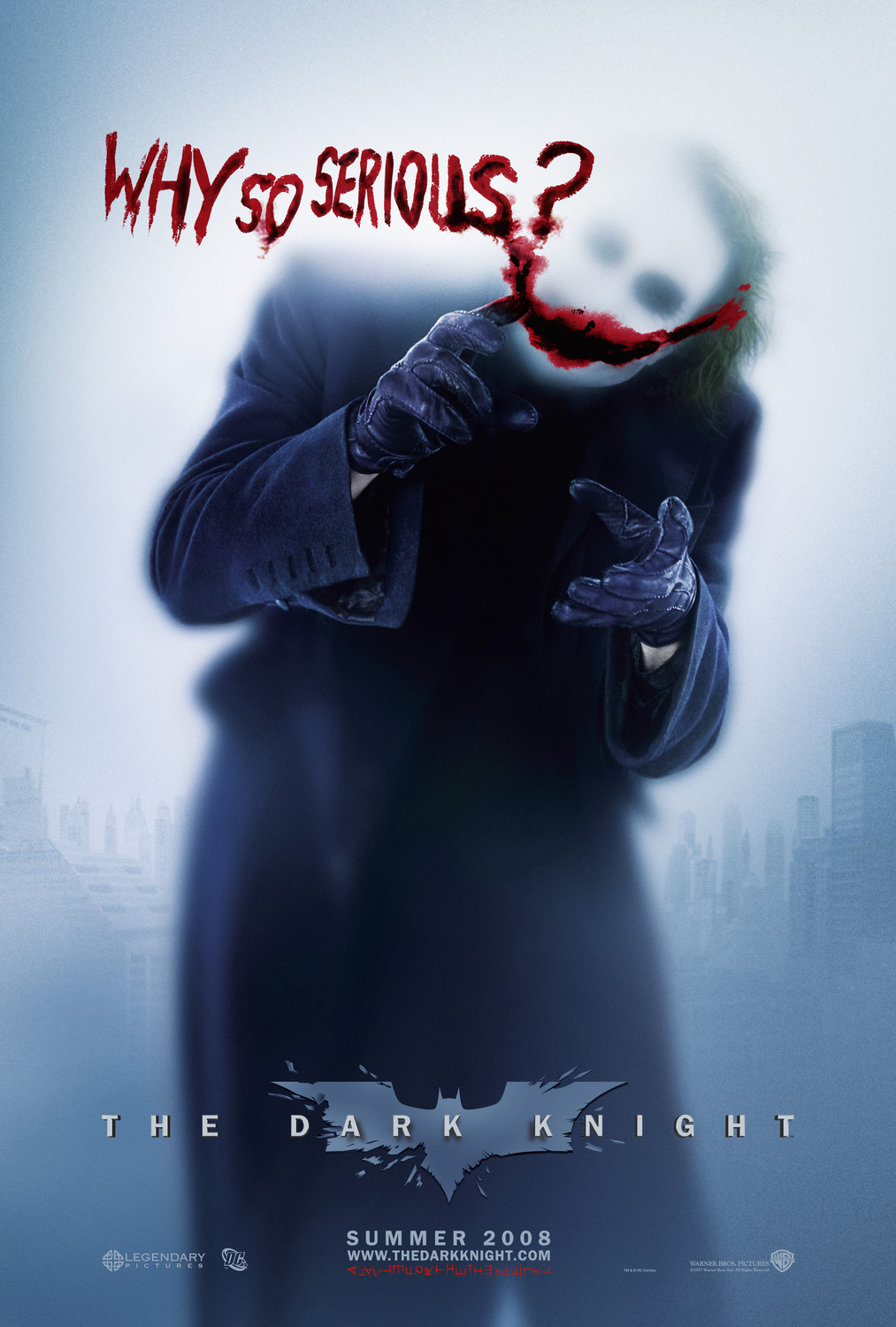 the actor for joker is very good as he is scary the role fit him the colour of his suit is good as he is the villain and he stands the costume out.
despicable me 2- the poster for despicable me 2 is good as there are many minions to chose and it has got their name on the poster.
the colour for this poster is normal as there is a white background with a yellow minions that stands out
1. http://www.youtube.com/watch?v=l2h75LLhxM4
2. http://www.youtube.com/watch?v=xBzPioph8CI

The audience like fast 6 because of the car racing, the action and the comedy
The sound in fast 6 is amazing as you can hear the cars accelerate and you can even hear the fighting music when the action start
this film is for teen and over as it has got violence
the trailer for fast 6 is good as the film has got explosion, car chase, action, comedy. people will love this film.
this film is for kids as they like cartoon
the audience mostly kids will like it as there is no violence
the sound is good as you can hear the
2 film poster
Dark Knight-
the actor for joker is very good as he is scary the role fit him the colour of his suit is good as he is the villain and he stands the costume out.despicable me 2- the poster for despicable me 2 is good as there are many minions to chose and it has got their name on the poster.
the colour for this poster is normal as there is a white background with a yellow minions that stands out

Tuesday, 8 October 2013
Technical Workshop Assignment 1
Editing script
Final Cut Pro is a software where you can edit and make you own short video.The software allows users to log and transfer video onto a hard drive.
In point and out put in Final Cut Pro- when you have chosen a scene of a video or something else in final cut pro you can press the letter "I" for input the section and input means the starting of the section you want. output is the same it means the end of the section you want and the letter you press is letter "O".
Insert and overwrite- once you have chosen your section of the scene you click on the icon Insert and what that do will insert the section of the scene you have chosen and place it on the timeline that will make it neat. also you can also click on the icon overwrite and what that does is crop a bit of the first video and add it on where the first video is cropped so it will be on one scene to the other.
Keyboard Shortcut- instead of using the mouse to click on stuff in final cut pro there is a easy way and that using the keyboard. the keyboard is a short cut instead of clicking it will save time and easy to learn here are some of the example on keyboard: (spacebar is for pausing and playing in final cut pro/ if you press "I" that is for Input and if you press "O"that is for Output etc.
The Two screen- the first screen in final cut pro is for editing your scene/ section and on the other screen that is for viewing all the edited stuff you have done on the first scene.
Time Line- Clips can be edit together in timelines called sequences. Sequences can be nested inside other sequences, so that a filter or transition can be applied to the grouped clips.
Video Transition- you can add fancy transition on in final cut pro here are some of the transition in final cut pro: 3D Simulation/ Dissolve/ Iris/ Map/ Page Peel/ Quick Time/ Slide/ Stretch and wipe.
Final Cut Pro picture on the internet and on your phone- you can get your own picture on your phone or on the internet and drag it on the final cut pro and what you can do with it you can edit/ put any transition on it to make it good etc. and once you have done editing it you can watch i as it is a small clip or a slide show on your work.
Sound- if you think your video is boring when it is silent you can add sound effect or your music in final cut pro you just have to chose your music you want and save it on the mac, then drag the music of your choice in final cut pro and place it on the timeline. also there is an icon where you cut the section of the music you like and place it where you think it is good.
Final Cut Pro is a software where you can edit and make you own short video.The software allows users to log and transfer video onto a hard drive.
In point and out put in Final Cut Pro- when you have chosen a scene of a video or something else in final cut pro you can press the letter "I" for input the section and input means the starting of the section you want. output is the same it means the end of the section you want and the letter you press is letter "O".
Insert and overwrite- once you have chosen your section of the scene you click on the icon Insert and what that do will insert the section of the scene you have chosen and place it on the timeline that will make it neat. also you can also click on the icon overwrite and what that does is crop a bit of the first video and add it on where the first video is cropped so it will be on one scene to the other.
Keyboard Shortcut- instead of using the mouse to click on stuff in final cut pro there is a easy way and that using the keyboard. the keyboard is a short cut instead of clicking it will save time and easy to learn here are some of the example on keyboard: (spacebar is for pausing and playing in final cut pro/ if you press "I" that is for Input and if you press "O"that is for Output etc.
The Two screen- the first screen in final cut pro is for editing your scene/ section and on the other screen that is for viewing all the edited stuff you have done on the first scene.
Time Line- Clips can be edit together in timelines called sequences. Sequences can be nested inside other sequences, so that a filter or transition can be applied to the grouped clips.
Video Transition- you can add fancy transition on in final cut pro here are some of the transition in final cut pro: 3D Simulation/ Dissolve/ Iris/ Map/ Page Peel/ Quick Time/ Slide/ Stretch and wipe.
Final Cut Pro picture on the internet and on your phone- you can get your own picture on your phone or on the internet and drag it on the final cut pro and what you can do with it you can edit/ put any transition on it to make it good etc. and once you have done editing it you can watch i as it is a small clip or a slide show on your work.
Sound- if you think your video is boring when it is silent you can add sound effect or your music in final cut pro you just have to chose your music you want and save it on the mac, then drag the music of your choice in final cut pro and place it on the timeline. also there is an icon where you cut the section of the music you like and place it where you think it is good.
Technical Workshop Assignment 1 Syncing video and sound
Syncing video and sound
Slate/Clapper Bored- black and white clapper.
------------------------------------------------------------
Sync Process
| Clapper Bored |
------------------------------------------------------------
Sync Process
- "Quiet on set"
- "Camera Rolling" (press record)
- "Speed"
- "Sound Recording" (Speed)
- "Clap"- Must be seen.
Monday, 7 October 2013
Subscribe to:
Posts (Atom)